Osprey IT Review Document
1. Introduction
Purpose of this Review
This document provides an overview of Osprey's architecture, security, and IT considerations to support deployment within enterprise environments.
About Osprey
This industrial data platform consists of three integrated components:
- Data Observability - A data observability application built specifically for the AVEVA PI System and real-time platforms. It provides visibility into data quality, lineage, and governance to help industrial organizations maintain trusted operational data.
- Engineering Knowledge Base - A document management system for storing, versioning, and discovering engineering documentation with AI-powered search capabilities.
- P&ID Extraction - An AI-powered tool for extracting asset hierarchies from P&ID (Piping & Instrumentation Diagram) documents to accelerate asset data model projects.
Executive Summary
Key Security Highlights:
- Read-only by default - No writes to PI System. All access is read-only
- No PII processing - Only technical metadata, configuration metadata, and summary statistics metadata
- Containerized deployment - Docker-based with enterprise security controls
- Local user management - Administrator-controlled user accounts with role-based access
- Data sovereignty - All data remains within customer infrastructure
- Encrypted communications - TLS in transit
- Audit compliance - User login audit
Deployment Impact:
- Zero impact on PI System operations if Osprey is unavailable
- Least privilege access with read-only scanner credentials
- Flexible deployment: on-premises (Data Center VM/Azure VM/AWS EC2) or air-gapped environments
2. System Architecture
Overview
Osprey is delivered as a containerized application, deployed using Docker. The containers consist of:
- Osprey Application: Web UI and API endpoints
- Database: PostgreSQL for metadata, lineage, issues, and configuration
- Scanners: .NET-based Agents that connect to PI Data Archive, Asset Framework, and PI Vision
- Notification Channels: Optional connections to Teams, Slack, ServiceNow, or email (via Sendgrid)
- AI-Powered Components (Optional): LLM-based features for document intelligence and automation
Windows Server Requirements:
- Docker Desktop requires either Windows Subsystem for Linux 2 (WSL 2) or Hyper-V
- For Azure VMs: Requires v3+ VM series (Dv3, Ev3, Fsv2) for nested virtualization support
- For VMware environments: Nested virtualization must be enabled on the hypervisor
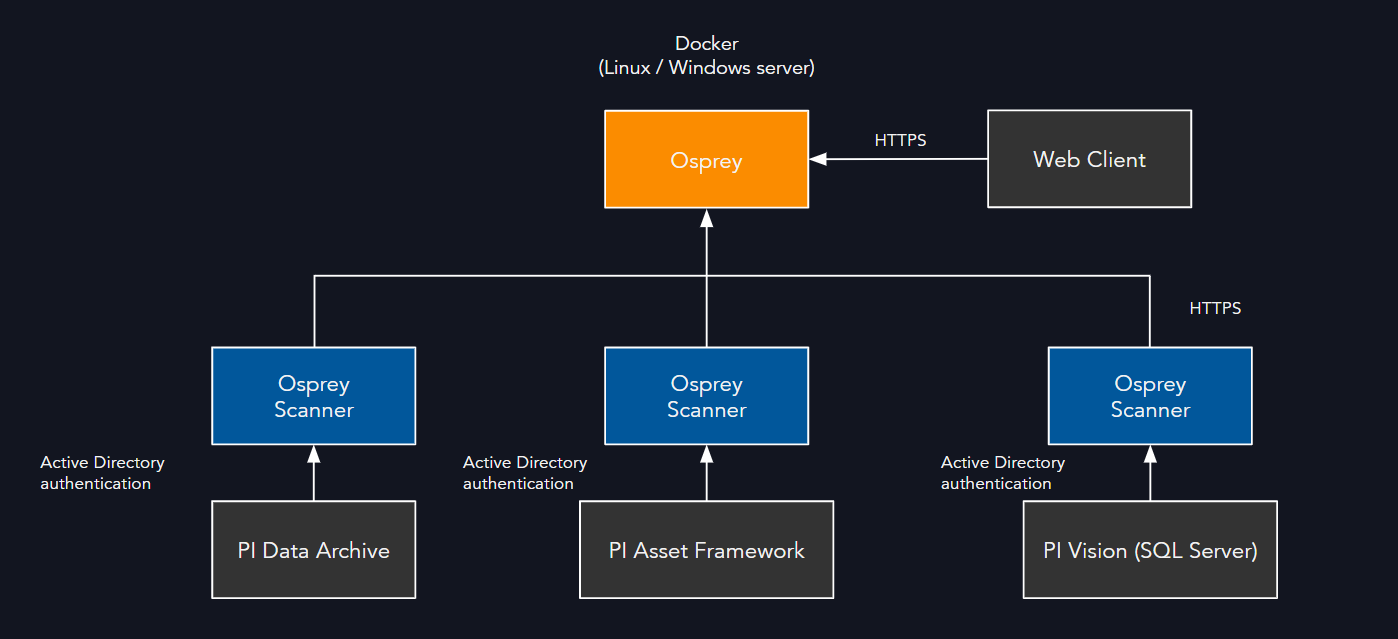
Deployment Models
- On-Premises: Installed within customer-managed infrastructure
- Hybrid: Scanners run on-prem; backend hosted in cloud environment (Azure, AWS, or private cloud)
- Air-Gapped: Fully offline, deployed on local servers with no internet connectivity
Data Flow
- Osprey connects to PI Data Archive, PI Asset Framework, and PI Vision SQL Server database in read-only mode
- Data collected: PI Tag metadata, PI AF metadata, PI Vision display configuration, and PI Tag / PI AF data quality metadata
AI/LLM Features (Optional)
The platform includes optional AI-powered features that use Large Language Models (LLMs) for intelligent automation and insights.
Deployment Options: - Self-hosted LLM within customer infrastructure - Enterprise Azure OpenAI (ai.azure.com) using customer's own Azure subscription
Supported Models: - OpenAI GPT-4.1-mini (for text generation and reasoning) - OpenAI text-embedding-3-large (for semantic search and document retrieval)
Use Cases: - Summarizing issues for incident creation - Summarizing complex calculations and formulas - Summarizing audit trail differences for change tracking - Answering questions about engineering documentation - Search and discovery of engineering documentation with semantic understanding - Aiding portions of tag mapping process (mapping attributes to instruments)
Important Notes: - All AI/LLM features are optional and are disabled by default - When using enterprise Azure OpenAI, data is processed within the customer's Azure tenant - Self-hosted LLM options keep all data processing within customer infrastructure but may run slower and may not be as accurate
3. Security Considerations
Authentication and Authorization
- Role-based access controls (Viewer, Contributor, Domain Admin, Workspace Admin)
- Local user account management by administrators
- API token support for service principals
- User credentials encrypted using bcrypt one-way hashing
- Password strength requirements:
- Be at least 8 characters long
- Contain at least one letter
- Contain at least one number
- Contain at least one special character
Data Protection
- TLS encryption for data in transit
- Data at rest encryption available through infrastructure-level encryption (disk/volume encryption)
- User passwords encrypted using bcrypt one-way hashing
- Secrets and credentials stored using industry-standard encryption
AI/LLM Data Processing (Optional Features)
- When AI/LLM features are enabled, only metadata and technical documentation are processed
- Self-hosted LLM: All processing occurs within customer infrastructure with no external data transmission
- Enterprise Azure OpenAI: Data is processed within the customer's Azure tenant, subject to Azure AI data privacy policies
- No process data values or sensitive operational data are sent to LLM services
- LLM processing is limited to: tag names, attribute names, calculation formulas, documentation text, and issue descriptions
Access Control
- Scanners operate with least privilege, requiring read-only credentials
- Segmented access per domain to support multi-business-unit, multi-PI System environments
Audit & Logging
- Activity logs for user sessions and administrative actions
4. Compliance and Governance
- All data remains within customer-controlled infrastructure unless explicitly integrated with external services
5. Integration and Extensibility
Native Integrations
- PI Data Archive, PI Asset Framework, PI Vision
- Microsoft Teams, Slack, ServiceNow, and email notifications (via Sendgrid)
- Excel and API endpoints for data export
Custom Integrations
- REST API available for external applications (Python, Power BI)
6. Scalability and Performance
- Designed to support millions of PI tags across multiple systems
- Containerized deployment allows horizontal scaling
- Resource requirements (baseline guidance):
- 4 CPU cores
- 16GB RAM required, 32GB recommended
- 50GB storage
7. Reliability and Support
- Backup and restore procedures for PostgreSQL
- Support model available through Osprey or certified system integrators
8. Change Management
- Regular software updates, including security patches and feature releases
- Tested against PI System upgrades for compatibility assurance
9. Risk Mitigation and FAQ
Does Osprey write back to PI?
By default, no. Osprey operates in a read-only mode. Optional write actions are limited to configured alerting or annotation integrations.
What happens if Osprey is unavailable?
Osprey downtime does not affect PI operations. PI continues to function normally, with only observability features paused.
How are vulnerabilities managed?
Patching cadence follows standard security practices. CVEs are reviewed and addressed as part of the monthly/quarterly release cycle.
What data does Osprey collect and store?
Osprey collects only technical metadata: tag configurations, lineage relationships, data quality/statistics metrics. No process data values are stored.
Where is data stored and who has access?
All data is stored within customer-controlled infrastructure (on-premises or customer cloud). Access is controlled through role-based permissions managed by system administrators within Osprey.
What network connections does Osprey require?
- Inbound: HTTPS (443) for web interface access
- Outbound: Optional connections to notification services (Teams, Slack, email via Sendgrid)
- Internal: Read-only connections to PI Data Archive (5450), PI AF Server (5457), and PI Vision SQL Server database (1433)
How is data backed up and recovered?
Standard PostgreSQL backup procedures apply. Configuration and metadata can be exported. Full backup and restore procedures are documented in the installation guide.
What credentials does Osprey require for PI System?
- PI Data Archive: Active Directory service account with read-only PI permissions to PI point and PI data tag security
- PI Asset Framework: Active Directory service account with read-only permissions to entire database(s)
- PI Vision: Read-only Active Directory service account with read-only permissions to PIVision SQL Server database
What third-party dependencies exist?
- PostgreSQL database engine
- Docker runtime environment
- Optional: notification service APIs (Teams, Slack, ServiceNow, Email via SendGrid)
- Optional: LLM services (self-hosted models or enterprise Azure OpenAI via customer's Azure subscription)
- All dependencies are industry-standard, well-maintained components
How is incident response handled?
- Application logs and audit trails support forensic analysis
- Support escalation procedures available with 24h SLA
Can Osprey be deployed in air-gapped environments?
Yes. Osprey supports fully offline deployment with no internet connectivity required for normal operations.
What are the Windows Server virtualization requirements?
Osprey requires Docker Desktop on Windows, which needs either:
- WSL 2 (Recommended): Windows Subsystem for Linux 2 with virtualization support
- Hyper-V: Windows Hyper-V role enabled
- Azure VMs: Must use v3+ series (Dv3, Ev3, Fsv2) that support nested virtualization
- VMware/Hyper-V VMs: Host hypervisor must have nested virtualization enabled
What AI/LLM features are available and are they required?
All AI/LLM features are optional and can be enabled or disabled based on customer requirements. Features include: - Intelligent issue summarization for incident creation - Complex calculation and formula summarization - Audit trail difference analysis - Natural language querying of engineering documentation - Semantic search and discovery across documentation - Automated tag mapping assistance (attribute-to-instrument mapping)
The platform functions fully without AI features enabled.
How is AI/LLM data processed and where does it go?
When AI features are enabled, customers can choose between:
- Self-hosted LLM: All data processing occurs within customer infrastructure with zero external transmission.
- Enterprise Azure OpenAI: Data is processed within the customer's own Azure tenant using Azure AI services (ai.azure.com), subject to Microsoft's Azure OpenAI data privacy and compliance policies
Only technical metadata is processed by LLMs (tag names, attribute names, calculation formulas, documentation text, issue descriptions). No process data values or sensitive operational measurements are sent to LLM services.
What LLM models are supported?
The platform is developed and tested against: - OpenAI GPT-4.1-mini (for text generation, summarization, and reasoning tasks) - OpenAI text-embedding-3-large (for semantic search and document embeddings)
These models can be accessed via self-hosted deployments or through enterprise Azure AI service within the customer's Azure subscription.