Data Quality Rules Engine
1. Overview
The Data Quality Rules Engine is a feature that allows organizations to automate and standardize data quality checks across all assets in the Osprey platform. With a flexible, Python-like expression language, users can define custom rules to monitor data health, catch anomalies, and enforce business standards--ensuring your data is always reliable and actionable.
Key Features:
-
Custom rule creation using Python-like expressions for maximum flexibility
-
Asset-level and type-level rule scoping to target specific assets or entire asset types
-
Inline rule testing and evaluation for rapid development
-
Rule overrides for asset-specific exceptions
-
Bulk duplication of rules across many assets
-
Automated check results with pass, warn, and fail statuses for clear reporting
Use Cases:
-
Ensuring sensor data completeness and accuracy
-
Monitoring table row counts or null values
-
Validating analysis results
-
Enforcing business logic on any asset type
2. Concepts & Terminology
Understanding the core concepts is key to using the rules engine effectively:
-
Asset: Any data object in the platform (e.g., tag, table, element attribute, analysis).
-
Rule: A logical expression that defines a data quality check for an asset.
-
Rule Scope: Determines if a rule applies to a single asset or all assets of a type.
-
Check: The result of evaluating a rule against an asset.
-
Warning vs. Failure: Checks can be configured to warn (non-critical) or fail (critical) when a rule does not pass.
-
Override: Customizing a type-level rule for a specific asset.
-
Duplication: Copying an overridden rule to multiple assets for efficiency.
3. User Guide
This section walks you through using the rules engine in the Osprey UI.
3.1. Accessing the Rules Engine
To get started, navigate to any asset’s page and open the Data Quality Rules tab. Here, you can view, add, or manage rules. Only Domain Admins and Contributors have permission to create, edit, or delete rules.
3.2. Viewing Rules
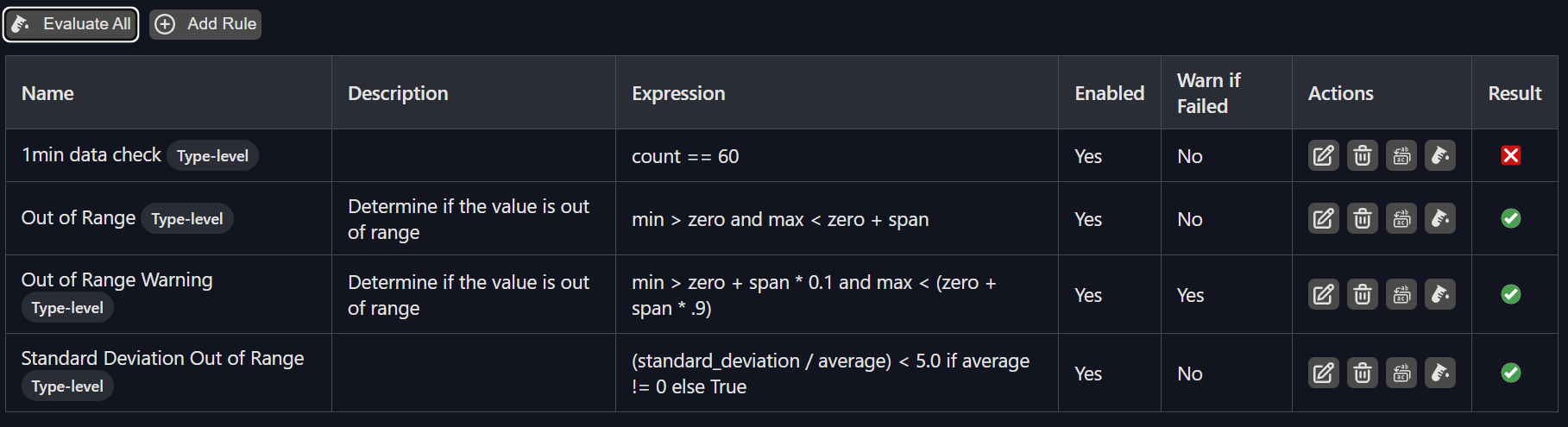
The rules table lists all rules applicable to the asset, including both type-level and asset-level (overridden) rules. Each rule displays its name, description, expression, status (enabled/disabled), and result (pass/warn/fail) for easy review.
3.3. Creating and Editing Rules
To create a new rule, click Add Rule. Fill in the rule name, description, and expression. Choose the scope (this asset only or all assets of this type), set whether the rule is enabled, and decide if it should warn instead of fail when not passing. Save the rule to apply it.
3.4. Rule Expressions
Rules use a Python-like expression language. Expressions must evaluate to True (pass) or False (fail). Only a safe subset of Python is supported, which means no loops, imports, or assignments.
Allowed Operators:
-
Arithmetic:
+,-,*,/,%,** -
Comparison:
==,!=,<,<=,>,>= -
Logical:
and,or,not -
Membership:
in,not in -
Parentheses for grouping:
( ... ) -
Conditional expressions:
a if condition else b
Parameters Available in Expressions: You can reference any property of the asset as a variable in your rule expression. These parameters are:
-
Properties Tab: All fields shown in the Properties tab (e.g.,
status,source_system,data_reference, etc.) -
Data Profile Tab: For tags and element attributes, metrics such as
percent_good,count,average,min,max,standard_deviation, etc. -
Analysis Profile Tab: For analysis assets, fields such as
Status,StatusDetail,LastLag,AverageLag,LastTrigger, etc.
Examples:
percent_good > 99 and count > 1000
status == "Good" and average >= 0
time_since_last_scan < 14400 or scan == 0
3.5. Testing and Evaluating Rules
Before saving, use the Evaluate button to test a rule’s expression inline. Use Evaluate All to run all rules for the asset and view results instantly.
3.6. Duplicating Rules
For asset-level or overridden rules (does not work on type-level rules), click Duplicate to other assets. Filter and select target assets (by unique_id or name, regex supported), then confirm to apply the rule to all selected assets.
3.7. Managing Rule Results
The rules table shows the result of each check:
-
Pass: Rule evaluated to true
-
Warn: Rule failed but is configured as a warning
-
Fail: Rule failed and is critical Enable or disable checks as needed.
4. Administration
This section covers permissions, bulk operations, and audit/history features for rules management.
4.1. Rule Management Permissions
Only users with the Domain Admin or Contributor role can create, edit, override, or delete rules.
4.2. Bulk Operations
Use the duplication feature to apply an overridden rule to multiple assets at once. Delete or disable rules in bulk as needed for efficient management.
5. Technical Reference
This section provides technical details for advanced users and integrators.
5.1. Rule Evaluation Engine
Rules are evaluated using a secure Python-like expression evaluator. Only safe operations and functions are allowed. Expressions are evaluated in the context of the asset’s properties and metrics.
5.2. Error Handling
-
Invalid Expression: If the rule expression is invalid, an error message is shown.
-
Missing Parameters: If a referenced parameter is not available, the rule will fail.
-
Permission Denied: Only authorized users can manage rules.
6. Best Practices & FAQ
This section offers tips and answers to common questions.
Writing Effective Rules
Use clear, descriptive names and descriptions for rules. Test expressions before saving. Use type-level rules for consistency, and asset-level overrides for exceptions.
Performance Considerations
Avoid overly complex expressions. Use available parameters efficiently for best performance.
Frequently Asked Questions
Q: Can I use any Python code in rule expressions?
A: No, only a safe subset of Python operators and functions is supported.
Q: How do I know which parameters are available?
A: Refer to the Properties, Data Profile, or Analysis Profile tabs for available fields.
Q: What happens if I override a type-level rule?
A: The asset-level rule takes precedence for that asset. You can revert to the type-level rule by deleting the override.
Q: Can I apply the same rule to many assets?
A: Yes, use the duplication feature to copy an overridden rule to multiple assets of the same type.
Available Properties and Metrics
Below are the properties and metrics available for use in rule expressions. These can be referenced directly by name in your rule logic.
Tag Properties
| Property | Example Value |
|---|---|
| asset_type | Tag |
| point_source | R |
| ex_desc | |
| instrument_tag | |
| eng_units | DEG. C |
| digital_set_name | |
| data_security | piadmin: A(r,w) | piadmins: A(r,w) | PIWorld: A(r) |
| point_security | piadmin: A(r,w) | piadmins: A(r,w) | PIWorld: A(r) |
| location1 | 0 |
| zero | 50 |
| span | 200 |
| source_tag | |
| compression_deviation | 4 |
| compression_percentage | 2 |
| compression_minimum | 0 |
| compression_maximum | 28800 |
| exception_deviation | 2 |
| exception_percentage | 1 |
| exception_minimum | 0 |
| exception_maximum | 600 |
| compressing | 1 |
| scan | 1 |
| point_type | Float32 |
Tag Data Profile Metrics
| Metric | Example Value |
|---|---|
| status | Good |
| is_good | True |
| tag_is_pt_created | False |
| tag_does_not_exist | False |
| tag_is_configure | False |
| time_since_last_value | 14.0 |
| start_time | 2025-06-11 17:40:45.120511 |
| end_time | 2025-06-11 18:40:45.120511 |
| count | 1.0 |
| average | 50.4994 |
| min | 50.4994 |
| max | 50.4994 |
| percent_good | 100.0 |
| standard_deviation | 0.0 |
Element Attribute Properties
| Property | Example Value |
|---|---|
| asset_type | ElementAttribute |
| full_path | \AFSERVER\Terradyne... |
| attribute_path | \AFSERVER\Terradyne... |
| parent_element_name | P-30242 |
| parent_element_path | \AFSERVER\Terradyne... |
| is_manual_data_entry | False |
| data_reference | PI Point |
| is_configuration_item | False |
| is_data_reference_defined_by_template | False |
| config_string | ... |
Element Attribute Data Profile Metrics
| Metric | Example Value |
|---|---|
| status | Good |
| is_good | True |
| tag_is_pt_created | False |
| tag_does_not_exist | False |
| tag_is_configure | False |
| time_since_last_value | 14.0 |
| start_time | 2025-06-11 17:43:50.599072 |
| end_time | 2025-06-11 18:43:50.599072 |
| average | 51.67 |
| min | 47.67 |
| max | 53.57 |
| percent_good | 100.0 |
| standard_deviation | 2.04 |
Analysis Properties
| Property | Example Value |
|---|---|
| asset_type | Analysis |
| analysis_rule_plugin | PerformanceEquation |
| categories | |
| time_rule_plugin | Natural |
| analysis_rule_variable_mapping | ... |
| output_time | |
| analysis_rule_display_string | ... |
| analysis_rule_config_string | ... |
Analysis Profile Fields
| Field | Example Value |
|---|---|
| Guid | 00000000-0000-0000-0000-000000000000 |
| Name | Alarm |
| Path | Alarm |
| Status | Running |
| StatusDetail | None |
| LastLag | 0.0 |
| AverageLag | 0.0 |
| LastTrigger | 0001-01-01T00:00:00 |