Bulk Export by Point Sources
Overview
The Bulk Export by Point Sources feature provides a comprehensive way to export all tags associated with specific point sources along with their complete downstream lineage dependencies. This export functionality generates a detailed CSV report that traces data flow from selected point sources through the entire PI System ecosystem.
Why Use Bulk Export by Point Sources
Business Scenarios
Divestitures and Asset Transfers
During corporate divestitures, organizations need to understand the complete data dependency chain associated with assets being transferred or sold. The bulk export helps identify:
- All tags associated with divested facilities or equipment
- Downstream calculations, displays, and reports that depend on divested data
- Integration points that will be affected by the divestiture
- Historical data archival requirements for transferred assets
Interface Management and Decommissioning
When planning to turn off or modify data interfaces, understanding the downstream impact is critical. The bulk export reveals:
- Which PI Vision displays will lose data sources
- AF calculations that depend on interface data
- Reports and dashboards that will be affected
- Secondary systems that consume the data
Data Source Consolidation
Organizations consolidating multiple data sources can use bulk export to:
- Identify redundant data streams
- Understand cross-dependencies between different point sources
- Plan migration strategies for dependent systems
- Validate data lineage before consolidation
Compliance and Audit Requirements
Regulatory compliance often requires understanding data lineage and dependencies:
- Document data flow for audit purposes
- Identify critical data paths for compliance reporting
- Understand retention requirements for connected data
- Validate data governance policies
What Will Be Impacted Analysis
The bulk export provides a complete impact analysis by showing:
Immediate Dependencies (Distance 1)
- PI Vision displays directly referencing the point source tags
- AF calculations that use the tags as inputs
- Manual data entry points that reference the tags
Secondary Dependencies (Distance 2+)
- Calculations that depend on primary calculations
- Displays that reference calculated values
- Reports that aggregate multiple data streams
- Dashboards that present derived information
Zero Distance Items
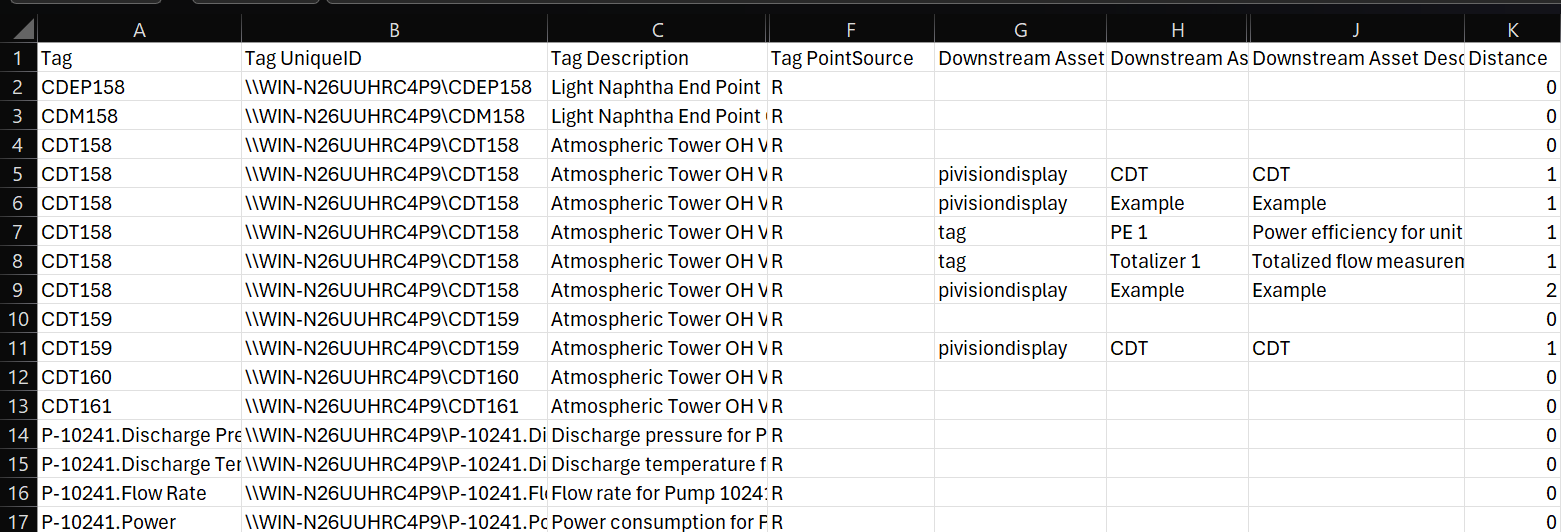
Tags with distance 0 indicate point sources that have no downstream dependencies, representing: - Isolated data streams that can be safely removed - Potential candidates for decommissioning - Data sources with no current business impact
How to Export
- Navigate to Settings: From the left navigation menu, click on Settings
- Access Data Export: In the Settings page, locate and click on Data Export
- Navigate to Bulk Export by Point Source: Find the Bulk Export by Point Source section
- Configure Export Parameters:
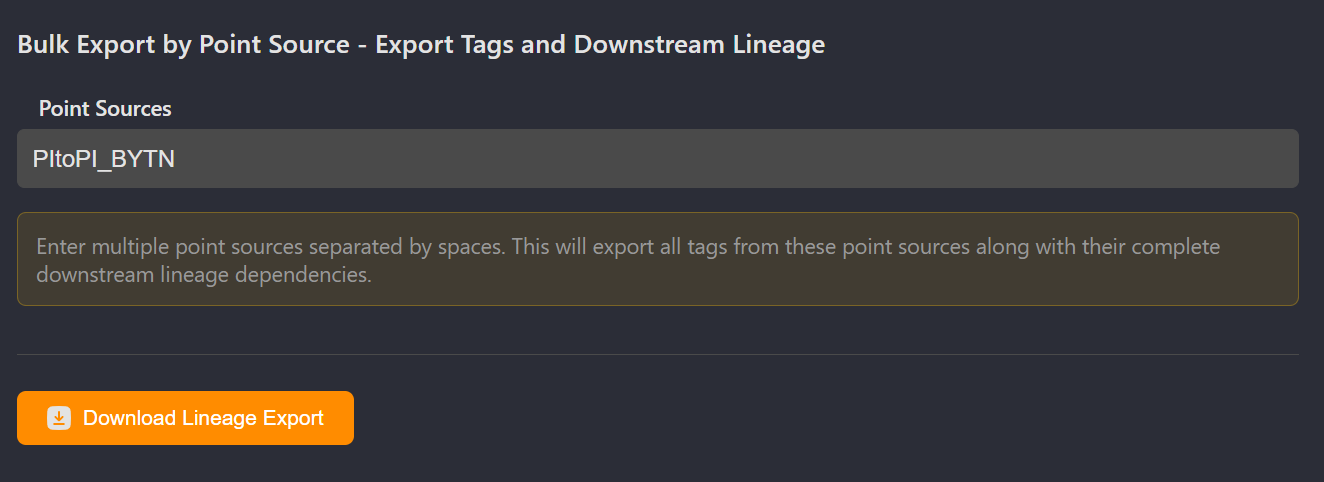
- Enter the point source identifiers you want to analyze. Separate multiple pointsources by spaces.
- Execute Export: Click the export button to download the report
Export Structure and Information
The CSV export includes comprehensive information about both source tags and their dependencies:
Tag Information (Always Present)
- Tag: Tag name or unique identifier
- Tag UniqueID: Complete unique identifier for the tag
- Tag Description: Business description of the tag
- Tag Osprey Asset ID: Internal system identifier
- Tag Osprey URL: Direct link to tag details in Osprey
- Tag PointSource: Source system or interface identifier
Downstream Asset Information (When Dependencies Exist)
- Downstream Asset Type: Type of dependent asset (calculation, display, etc.)
- Downstream Asset Name: Name of the dependent asset
- Downstream Asset UniqueID: Unique identifier for dependent asset
- Downstream Asset Description: Business description of dependent asset
- Distance: Number of relationship hops from source tag
- Downstream Osprey Asset ID: Internal identifier for dependent asset
- Downstream Osprey URL: Direct link to dependent asset in Osprey
Use Cases and Workflows
Pre-Divestiture Assessment
- Export all tags for facilities being divested
- Review distance 0 items (no impact to remaining operations)
- Analyze distance 1+ items for systems requiring updates
- Plan communication strategy for affected stakeholders
- Develop timeline for system modifications
Interface Decommissioning
- Export tags associated with interface being retired
- Identify all PI Vision displays that will lose data
- Review calculated values that depend on interface data
- Plan alternative data sources or system modifications
- Communicate downtime and impact to users
Data Governance and Compliance
- Export critical process data point sources
- Document complete data lineage for audit requirements
- Identify data retention requirements across all dependencies
- Validate data quality rules are applied throughout the chain
- Ensure backup and recovery plans cover all dependent systems
System Modernization Planning
- Export legacy system point sources
- Understand modernization scope based on dependencies
- Plan phased migration approach based on dependency complexity
- Identify integration testing requirements
- Develop rollback strategies for critical dependencies
Best Practices
Point Source Selection
- Use specific, well-defined point source identifiers
- Include all variations and aliases for comprehensive coverage
- Consider seasonal or operational variations in naming
- Validate point source names before large exports
Impact Analysis Process
- Review zero-distance items first to identify quick wins
- Prioritize high-distance items for detailed analysis
- Use Osprey URLs to drill down into specific dependencies
- Engage business stakeholders for critical path validation
Export Management
- Consider breaking large exports into smaller batches
- Archive export results for historical reference
- Share results with relevant technical and business teams
Change Management
- Use export results to communicate scope of changes
- Provide stakeholders with direct links to affected systems
- Document decision rationale for each impacted asset
- Plan testing scenarios based on dependency chains