AF Database Export Guide
Overview
The AF Database Export feature provides a comprehensive way to export all PI tags that are referenced within element attributes in a specific AF database. This export functionality generates a detailed CSV report that identifies all PI Data Archive connections used by AF calculations, element templates, and data references, enabling organizations to understand data dependencies and plan system changes effectively.
Why Use AF Database Export
Business Scenarios
AF Server Migrations and Upgrades
During AF server migrations or upgrades, organizations need to understand all PI Data Archive dependencies to ensure continuity. The AF database export helps identify:
- All PI tags referenced by AF element attributes and calculations
- Critical AF elements that depend on specific PI Data Archive servers
- Data connections that must remain available during migration
- Validation requirements for post-migration AF functionality
PI Data Archive Maintenance and Changes
When planning PI Data Archive maintenance, tag modifications, or server changes, the export enables impact analysis:
- Identify which AF calculations will be affected by PI tag changes
- Understand the scope of impact when PI servers require maintenance
- Locate AF elements using tags that will be modified or archived
- Plan coordinated maintenance windows across PI and AF systems
Data Quality and Governance
For ensuring data quality and implementing governance policies across PI and AF systems:
- Identify AF calculations using problematic or unreliable PI tags
- Document data lineage from PI Data Archive through AF processing
- Validate that AF elements reference current and approved data sources
- Ensure compliance with data governance policies across both systems
Performance Optimization and Troubleshooting
When AF databases experience performance issues or calculation problems:
- Identify which PI tags are heavily used by AF calculations
- Understand data retrieval patterns that may impact performance
- Locate AF elements affected by slow or unavailable PI data sources
- Plan optimization strategies for high-volume data connections
System Consolidation and Decommissioning
Organizations consolidating or decommissioning PI infrastructure can use the export to:
- Identify AF dependencies on PI servers being decommissioned
- Understand which AF calculations will require data source updates
- Plan migration strategies for AF elements dependent on legacy PI systems
- Validate data connectivity after consolidation activities
Template and Element Design Review
For AF template standardization and element design optimization:
- Identify commonly referenced PI tags across multiple AF elements
- Understand tag usage patterns for template optimization
- Locate AF elements that may benefit from standardized data connections
- Plan template updates based on actual PI tag usage
What Will Be Impacted Analysis
The AF database export provides comprehensive impact analysis by identifying:
AF Element Dependencies
- Direct Tag References: PI tags directly configured in element attributes
- Calculation Dependencies: Tags used in AF analysis rules and calculations
- Template Dependencies: PI tags referenced in element templates
- Historical Data Requirements: Tags needed for historical AF calculations
PI Data Archive Impact Assessment
- Server-Level Dependencies: AF elements dependent on specific PI servers
- Tag-Level Dependencies: Individual PI tags referenced by AF calculations
- Archive Dependencies: Historical data requirements from PI archives
- Performance Impact: High-frequency tag reads that may affect PI performance
Business Process Impact
- Real-Time Calculations: AF analyses dependent on live PI data
- Batch Processing: Scheduled AF calculations requiring PI data
- Reporting Systems: AF-based reports dependent on PI tags
- Integration Points: External systems consuming AF data derived from PI tags
How to Export
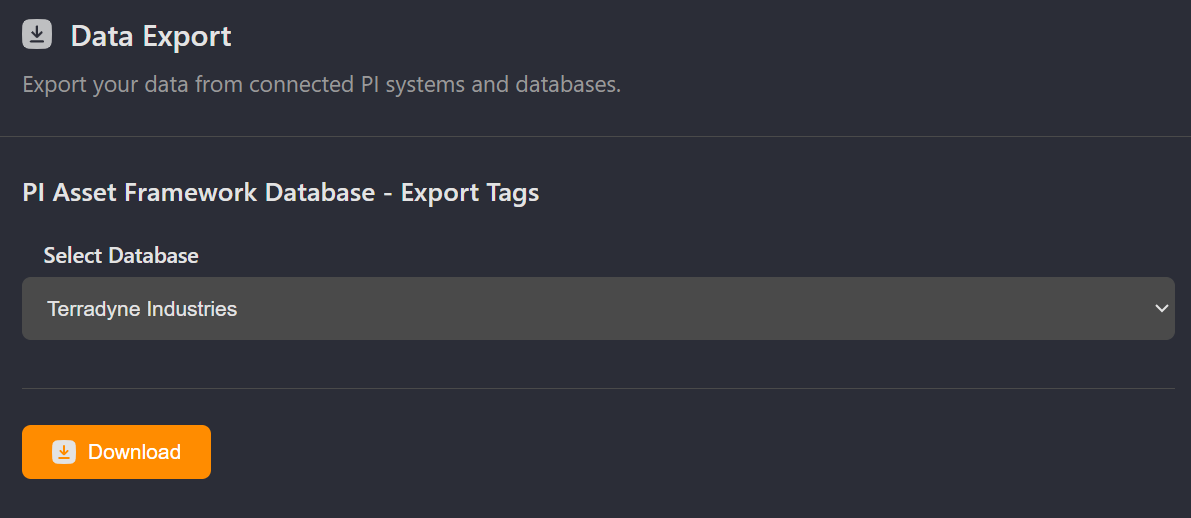
- Navigate to Settings: From the left navigation menu, click on Settings
- Access Data Export: In the Settings page, locate and click on Data Export
- Select PI Asset Framework Database Export: Find the PI Asset Framework Database - Export Tags section
- Configure Export Parameters:
- Select the PI AF Database to export
- Execute Export: Click the export button to download the report
Export Structure and Information
The CSV export includes comprehensive information about AF database dependencies:
AF Database Information
- AF Database: Name of the AF database containing the element attributes
- ElementAttribute Name: Specific element attribute referencing the PI tag
- ElementAttribute UniqueID: Complete path to the element attribute in AF hierarchy
PI Tag Information
- Tag Name: Name of the referenced PI tag
- Tag UniqueID: Complete unique identifier for the PI tag
- Osprey URL: Direct link to the tag details in Osprey
- Failed Checks: Any connectivity or data quality issues detected with the tag
Use Cases and Workflows
Pre-Migration Planning for AF Systems
- Export all element attributes from AF databases being migrated
- Group PI tags by source PI Data Archive server
- Identify AF elements requiring specific PI server connections
- Plan migration phases based on AF calculation criticality
- Develop testing procedures for each PI tag dependency
PI Data Archive Maintenance Coordination
- Export AF databases that may reference tags on the PI server requiring maintenance
- Identify all AF calculations potentially impacted by PI server downtime
- Plan maintenance windows considering AF calculation schedules
- Communicate impact scope to AF system administrators and users
- Validate AF functionality after PI server maintenance
Data Quality Improvement Programs
- Export AF databases to identify all PI tag dependencies
- Cross-reference with PI tag quality metrics and reliability data
- Identify AF calculations using poor-quality or unreliable PI data
- Plan data quality improvements prioritized by AF usage
- Implement monitoring for critical PI tags used by AF calculations
Performance Optimization Projects
- Export AF databases to understand PI tag usage patterns
- Identify high-frequency tag reads that may impact PI performance
- Analyze AF calculation timing and data retrieval patterns
- Plan caching strategies or calculation optimization
- Monitor performance improvements after optimization changes
System Consolidation and Modernization
- Export legacy AF databases to understand PI dependencies
- Map PI tag dependencies to target systems in consolidated architecture
- Identify AF elements requiring data source reconfiguration
- Plan phased migration approach based on dependency complexity
- Validate data connectivity in modernized AF environment
AF Template Standardization
- Export multiple AF databases to analyze common PI tag usage patterns
- Identify opportunities for template standardization
- Plan template updates based on actual PI tag dependencies
- Consolidate redundant or similar AF calculations
- Implement standardized templates with optimized PI tag references
Best Practices
Export Planning and Execution
- Schedule exports during AF maintenance windows to ensure complete data capture
- Coordinate with AF administrators to minimize impact on running calculations
- Consider AF database size and complexity when planning export timing
- Export from AF servers with current and complete PI tag connectivity
Data Analysis and Interpretation
- Sort results by PI server to understand infrastructure dependencies
- Group by AF element to understand calculation-level dependencies
- Use failed checks column to identify immediate connectivity issues
- Cross-reference with AF calculation performance metrics for optimization opportunities
Change Management and Communication
- Use export results to communicate scope of planned changes to AF stakeholders
- Provide AF developers with detailed dependency information for impact assessment
- Create dependency matrices showing AF elements affected by each PI system change
- Plan rollback procedures based on AF calculation criticality and business impact
Integration with PI System Planning
- Coordinate AF database exports with PI Data Archive maintenance schedules
- Align AF migration planning with PI system upgrade timelines
- Consider AF dependencies when planning PI server consolidation or decommissioning
- Validate AF functionality as part of PI system testing procedures
Documentation and Knowledge Management
- Archive export results before major AF or PI system changes
- Document decisions made based on AF dependency analysis
- Share results with AF developers, PI administrators, and business stakeholders
- Update AF documentation to reflect current PI tag dependencies
Ongoing Maintenance and Monitoring
- Schedule regular exports to monitor evolving AF dependencies on PI systems
- Track changes in PI tag usage patterns over time
- Identify trends in AF calculation complexity and data requirements
- Plan capacity and performance improvements proactively for both AF and PI systems
Integration with Other Export Features
Comprehensive System Analysis
- With PI Vision Export: Understand complete data flow from PI through AF to displays
- With Point Source Export: Trace data from collection through AF processing
- With System Architecture Documentation: Maintain complete PI System dependency maps
Multi-System Impact Assessment
- Export AF databases to understand calculation layer dependencies
- Export PI Vision displays to understand presentation layer impact
- Export point sources to understand data collection dependencies
- Combine results for complete system change impact analysis
Technical Considerations
Export Scope and Coverage
- Export includes all element attributes currently configured in the specified AF database
- Historical AF configurations are not captured in the export
- Custom AF analyses and calculation rules may reference additional PI tags not captured in standard attributes
- AF templates and element template dependencies are included in the export
Data Quality and Connectivity
- Failed checks indicate PI tags that are unreachable or have quality issues
- Network connectivity between AF and PI servers affects export completeness
- PI tag security and access permissions may impact AF element functionality
- Export timing relative to AF calculation schedules may affect completeness
Performance and Resource Considerations
- Large AF databases with extensive PI tag references may require extended export time
- Network traffic between AF and PI servers increases during export validation
- Export during off-peak hours for optimal system performance
- Consider AF calculation schedules when timing exports to minimize business impact