Osprey Architecture
This page provides an overview of the Tycho Data Osprey platform architecture, including deployment options, system components, and connectivity requirements.
Deployment Options
Osprey can be deployed either in the cloud or on-premises, depending on your organization's requirements and infrastructure. The platform is designed for flexibility and security in both scenarios.
Core Components
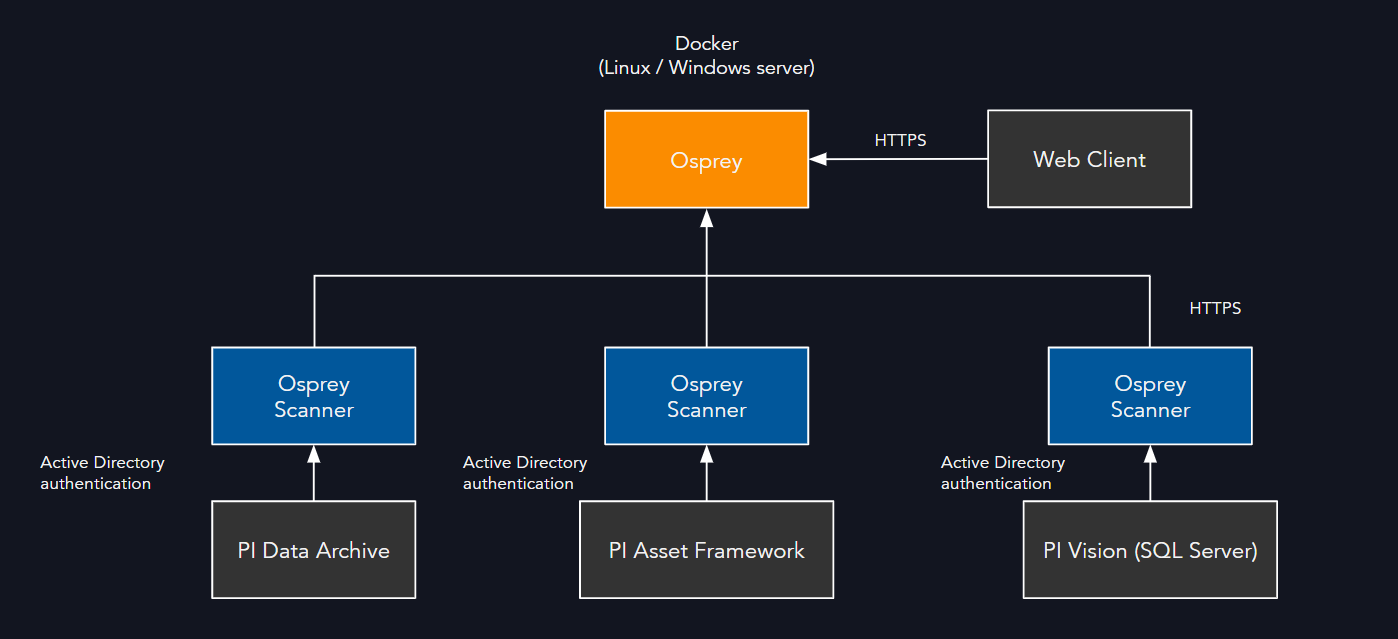
- Osprey Platform: Runs as a Docker container, deployed on either Windows or Linux servers.
- Recommended Server Specs: 32GB RAM or higher for production environments. 16GB RAM (required).
- Windows Deployment: Requires support for Docker, including Hyper-V and nested virtualization.
- Linux Deployment: Standard Docker support is sufficient.
- Osprey Scanners: Lightweight Windows services that connect to PI System components and report metadata and data quality to Osprey via HTTPS.
- Scanners are typically deployed on a Windows server within the PI System network.
- AI/LLM Components (Optional): Large Language Model integration for intelligent automation and document analysis.
- Can be deployed as self-hosted LLM within customer infrastructure.
- Alternatively, can use enterprise OpenAI (ai.azure.com) within customer's Azure subscription.
- Supported Models: OpenAI GPT-4.1-mini and OpenAI text-embedding-3-large.
- Used for issue summarization, calculation analysis, documentation search, and tag mapping assistance.
Connectivity & Authentication
- Scanners to PI System:
- Communicate with PI Data Archive and PI Asset Framework using the AF SDK (ports 5450, 5457).
- Authentication is handled via Windows Active Directory.
- PI Vision Scanner:
- Connects to the PI Vision SQL Server database using Windows Active Directory authentication.
- Scanners to Osprey:
- All scanner data is sent securely to Osprey over HTTPS.
- Client Access:
- Users access Osprey via a web browser over HTTPS.
Typical Deployment Flow
- Deploy Osprey (Docker container) on a Windows or Linux server.
- Deploy Osprey Scanners on a Windows server within the PI System network.
- Configure scanners to communicate with PI Data Archive, PI Asset Framework, and PI Vision (SQL Server).
- Users access Osprey via browser for dashboards, workflows, and data quality reports.
For more details on installation, see: - Install Osprey Scanner - Install Osprey on Windows - Install Osprey on Linux